Generating CRUD APIs with Godspeed
Overview
The Godspeed framework provides powerful CRUD API generation capabilities through the gen-crud-api command. This tool automatically creates standardized Create, Read, Update, and Delete (CRUD) endpoints based on your Prisma data models, significantly accelerating API development.
Key Features
- Automatic CRUD endpoint generation
- Prisma ORM integration
- Express.js-based HTTP endpoints
- Swagger documentation generation
- Database schema synchronization
Tutorial
Learn how to generate CRUD APIs in Godspeed:
Prerequisites
Before generating CRUD APIs, ensure you have:
- Godspeed CLI installed
- Access to a supported database
- Basic understanding of Prisma schema
Step-by-Step Implementation Guide
1. Project Setup
Create a new project or skip if already created.:
godspeed create my-project
Navigate to the project directory:
cd my-project
For installation and getting started, visit the Getting Started Guide
2. Prisma Plugin Installation
Install the Prisma datasource plugin:
godspeed plugin add @godspeedsystems/plugins-prisma-as-datastore
For plugin configuration details, refer to the Prisma Plugin Documentation
3. Database Configuration
Connection URL Setup
Add your database connection URL to the .env file:
# PostgreSQL example
DATABASE_URL="postgresql://username:password@localhost:5432/dbname"

# SQLite example
DATABASE_URL="file:./database.db"
Supported Databases
For database-specific connection formats, see:
4. Prisma Schema
Create a Prisma schema file in src/datasources/:
When configuring the Prisma client in your Godspeed project, ensure you add the output field in your Prisma schema's generator block. This field should point to this location src/datasources/prisma-clients/<prisma_schema_fileName/> where the generated prisma client files will be stored.
datasource db {
  provider = "postgresql"  // or mysql, sqlite, sqlserver
  url      = env("DATABASE_URL")
}

generator client {
  provider        = "prisma-client-js"
  output          = "./prisma-clients/schema"    //here schema is the name of prisma schema file
  previewFeatures = ["metrics"]
}

model User {
  id         Int      @id @default(autoincrement())
  email      String   @unique
  name       String
  createdAt  DateTime @default(now())
  updatedAt  DateTime @updatedAt
}
Important Configuration Notes
- Set the correct
providerfor your database - Configure the
outputpath for generated client - Enable
metricsin previewFeatures if needed for telemetry
Existing Database Integration
If you already have an existing database, you can introspect it and generate the Prisma model file using prisma db pull. This will generate your .prisma file.
Copy the generated file to src/datasources folder and rename it as per the name of this datasource that you want to keep. If you don't have an existing database setup with a model, then create a prisma model file from scratch.
5. Client Generation and Database Sync
Generate Prisma client and sync database:
godspeed prisma prepare
This command:
- Generates Prisma client
- Syncs database schema
- Creates client in
src/datasources/prisma-clients/
6. CRUD API Generation
Generate CRUD endpoints:
godspeed gen-crud-api
Select your schema when prompted:
Select datasource / schema to generate CRUD APIs
(x) schema.prisma
( ) For all
( ) Cancel
7. Testing Generated APIs
Start the server and test APIs:
godspeed serve
Access Swagger documentation at:
http://localhost:3000/api-docs
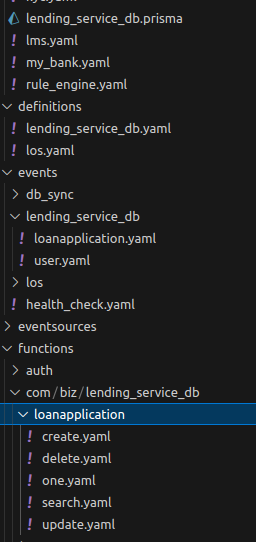
Generated Components
The generator creates:
- Event definitions
- API routes
- Functions
- Swagger documentation
Troubleshooting
Common Issues
-
Database Connection Errors
- Verify connection URL format
- Check database credentials
- Ensure database is running
-
Schema Generation Issues
- Validate Prisma schema syntax
- Check output directory permissions
- Verify database provider support
-
API Generation Problems
- Confirm Prisma client generation
- Check for schema validation errors
- Verify event source configuration
Remember to regularly update generated APIs as your data models evolve, and maintain proper version control of your schema files.